
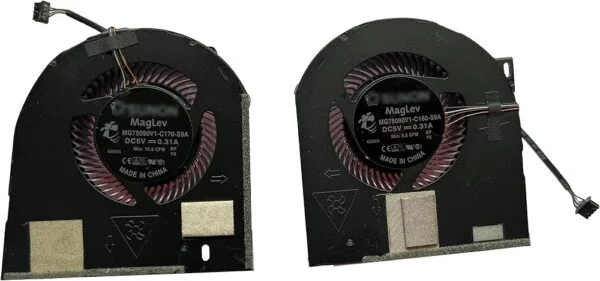
The Dell Precision 7530 and 7540 are two of the most powerful mobile workstations available today, built for engineers, video editors, architects, and data scientists who need serious computing power on the go. With Intel Core i7/i9 and Xeon processors paired with NVIDIA Quadro graphics cards, these machines are designed to handle CAD rendering, 3D modeling, machine learning workloads, and heavy multitasking without breaking a sweat. But all that power generates a lot of heat, and that’s where the CPU and GPU cooling fans come in.
If you own a Dell Precision 7530 or 7540 in Pakistan and you’ve noticed your laptop running hotter than usual, shutting down unexpectedly, or making unusual grinding noises, chances are your cooling fan needs attention. In this guide, we’ll walk you through everything you need to know about the cooling system in these workstations, common problems, and where to find a genuine replacement fan in Pakistan.
Why Cooling Matters So Much on the Precision 7530/7540
Unlike regular laptops, the Precision 7530 and 7540 are built for sustained heavy loads. Whether you’re rendering a complex 3D scene in AutoCAD, running simulations in MATLAB, or training a neural network locally, your CPU and dedicated NVIDIA GPU are working at near-full capacity for extended periods. Dell’s official setup and specifications guide confirms these laptops use dual-fan cooling systems, separate heat pipes for the CPU and GPU, and dedicated vents to manage this thermal load.
When the cooling fan starts to fail or gets clogged with dust, several things happen:
- Thermal throttling – Your CPU and GPU automatically reduce clock speeds to prevent damage, which slows down your work significantly.
- Random shutdowns – The system may power off abruptly to protect internal components from heat damage.
- Reduced lifespan – Prolonged overheating can degrade the motherboard, battery, and other internal components over time.
- Loud, unusual noises – A failing fan bearing often produces grinding, rattling, or high-pitched whining sounds.
For professionals in Pakistan who depend on their Precision workstation for client deliverables, downtime because of a faulty fan simply isn’t an option.
Common Cooling Fan Issues on Dell Precision 7530 and 7540
Users across Pakistan, especially in cities like Lahore, Karachi, and Islamabad where dust and heat can be harsh on electronics, commonly report the following fan-related issues:
- Dust accumulation – Pakistan’s dusty environment means fans clog up faster than in cleaner climates, restricting airflow and raising internal temperatures.
- Worn-out bearings – After a few years of continuous use, fan motors wear down, causing noise and reduced RPM.
- Fan not spinning at all – This is often a sign of a dead fan motor or a loose connector, and it usually requires immediate replacement.
- Inconsistent fan speeds – The fan cycles erratically between high and low speeds, often pointing to a sensor or fan controller issue.
- Physical damage – Fan blades can crack or bend due to mishandling or a previous repair attempt.
If you’re experiencing any of these symptoms, it’s a strong indicator that you need a genuine replacement CPU or GPU cooling fan rather than attempting a temporary fix. The same overheating symptoms are common on related Dell workstations too, including the Precision 7730/7740 and Precision 3540, so if you’re supporting a mixed fleet of Dell workstations in your office, it’s worth checking each model separately.
OEM vs. Generic Replacement Fans
One of the biggest mistakes users make is installing a generic, non-OEM fan to save a few rupees. The Precision 7530 and 7540 have precisely engineered heat sink assemblies where the fan size, blade pitch, and connector pinout must match exactly. A mismatched fan can lead to:
- Poor contact with the heat sink assembly
- Incorrect airflow direction
- Connector damage to the motherboard
- Reduced cooling efficiency, defeating the entire purpose of the replacement
This is why sourcing a genuine, Dell-compatible OEM cooling fan is critical, and why buying from a trusted supplier matters so much in the Pakistani market, where counterfeit and refurbished parts are unfortunately common.
Why Choose IT Online for Your Dell Precision Cooling Fan in Pakistan
IT Online has built a reputation as one of Pakistan’s most reliable sources for genuine Dell Precision parts, including CPU and GPU cooling fans for the 7530 and 7540 series. Here’s what sets IT Online apart for customers across Pakistan:
- Genuine OEM Parts – Every cooling fan sold is sourced to match Dell’s original specifications, ensuring perfect fit and thermal performance.
- Model-Specific Compatibility – IT Online stocks fans specifically verified for the Precision 7530 and 7540, avoiding the compatibility issues common with generic listings. You’ll also find the full range of Dell laptop cooling fans for other Latitude and Precision models.
- Nationwide Delivery – Whether you’re in Karachi, Lahore, Islamabad, Faisalabad, or Peshawar, IT Online delivers across Pakistan with reliable courier tracking.
- Competitive Pricing – Import and part sourcing costs are kept transparent, giving customers fair pricing without the inflated markups seen elsewhere.
- Expert Support – The team can help you identify whether you need the CPU fan, GPU fan, or the full cooling assembly based on your laptop’s symptoms — just reach out via Contact Us.
- Warranty-Backed Purchases – Parts come with after-sales support as outlined in the Warranty & Refund Policy, giving buyers confidence that they’re investing in a durable fix, not a temporary patch.
For freelancers, engineering firms, architecture studios, and IT departments across Pakistan who rely on Dell Precision workstations daily, having a dependable local source for genuine replacement parts saves both time and money compared to importing from overseas.
How to Order the Right Fan
Before placing an order, it helps to identify a few details:
- Confirm your exact model – 7530 and 7540 fans are similar but not always interchangeable, so check your laptop’s service tag against Dell’s official Precision 7530 specifications guide.
- Identify which fan has failed – CPU-side or GPU-side, or note if both need replacement.
- Check your GPU configuration – Some Precision units are configured with different NVIDIA Quadro cards, which can affect heat sink assembly compatibility.
- Reach out to IT Online’s support team – Contact IT Online to confirm compatibility using your service tag before you finalize the purchase, minimizing the risk of ordering the wrong part. You can also browse the complete Dell brand parts catalog for batteries, keyboards, and motherboards if you need other components too.
Final Thoughts
Your Dell Precision 7530 or 7540 is a serious investment, and keeping its cooling system in top shape is essential for protecting your work, your data, and the longevity of the machine. Ignoring fan issues almost always leads to bigger, more expensive repairs down the line, including motherboard damage from sustained overheating.
If you’re based in Pakistan and need a genuine CPU or GPU cooling fan for your Precision 7530 or 7540, shop the fan on IT Online for verified compatibility, fast delivery, and dependable support so you can get your workstation running cool and reliable again. You can also check out our full shop or blog for more laptop repair guides.
Frequently Asked Questions
- How do I know if my Dell Precision 7530/7540 fan needs replacement? Common signs include loud grinding or rattling noises, the laptop overheating even during light use, unexpected shutdowns, or the fan not spinning at all when you check via diagnostics or BIOS. If cleaning the vents doesn’t resolve the issue, replacement is usually necessary.
- Are the CPU and GPU fans on the Precision 7530 and 7540 the same part? No. These laptops use separate fan assemblies for the CPU and GPU, each connected to its own heat pipe system, as confirmed in Dell’s setup and specifications guide. It’s important to identify which one has failed before ordering, since installing the wrong fan won’t resolve the actual overheating source. IT Online sells the CPU and GPU fan pair together for this exact reason.
- Can I replace the cooling fan myself, or should I get professional help? While technically savvy users can replace the fan themselves using an online guide, it involves removing the keyboard, palm rest, and heat sink assembly, so improper handling can damage other components. IT Online can guide you through the process or recommend a technician if needed.
- Does IT Online deliver Dell Precision cooling fans outside major cities in Pakistan? Yes, IT Online ships nationwide across Pakistan, including smaller cities and towns, using tracked courier services so you can monitor your order from dispatch to delivery. Check the payment methods page for available checkout options, including cash on delivery.
- Will a generic, non-Dell fan work with the Precision 7530 or 7540? It’s not recommended. Generic fans often don’t match the exact size, connector pinout, or airflow design required, which can lead to poor cooling performance or even damage to the motherboard connector. Genuine OEM-compatible fans from IT Online are built to match Dell’s original specifications.
