
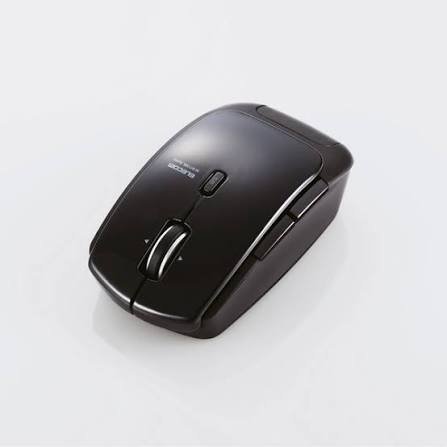
If you’re searching for a reliable Bluetooth mouse that skips the USB dongle hassle, the Elecom M-BT13BLBK Wireless Mouse is worth a close look. Part of Elecom’s M-BT13BL series, this Bluetooth 4.0 laser mouse was built with one clear goal: deliver precise tracking and exceptional power efficiency in a compact, everyday-use package. In this review, we’ll break down its design, features, performance, and whether it’s the right pick for your desk setup in 2026.
Elecom M-BT13BLBK: Key Specifications
- Connectivity: Bluetooth 4.0 (no USB receiver required)
- Sensor Type: Laser sensor
- Buttons: 5-button design
- Special Feature: Tilt wheel for left/right scrolling
- Weight: Approximately 52g
- Color Options: Black, Blue, Red
- Battery Life: Rated for roughly 1 year 3 months on a single set of batteries
- Compatibility: Windows and Bluetooth-enabled devices
These specs place the M-BT13BLBK squarely in the category of practical, no-frills productivity mice rather than gaming peripherals — and that’s exactly where it shines.
Design and Build Quality
The M-BT13BLBK follows a compact, symmetrical mouse body that fits comfortably in small to medium-sized hands. At just 52 grams, it’s noticeably lighter than many wired alternatives, making it a solid travel companion for laptop users who don’t want extra bulk in their bag. The matte black finish (also available in blue and red) gives it a clean, professional look that blends well into any office or home workstation.
Because it runs on Bluetooth 4.0 rather than a proprietary USB dongle, there’s no risk of losing a tiny receiver — a common frustration with budget wireless mice. Pairing is handled directly through your computer’s Bluetooth settings, which also frees up a USB port, a small but genuinely useful advantage for ultrabook and tablet users with limited ports.
Performance: Laser Sensor Precision
The standout feature of the M-BT13BLBK is its power-efficient laser sensor. Elecom engineered this sensor using a high-efficiency surface-emitting laser combined with refined image-processing technology, striking a balance between tracking accuracy and battery conservation. In everyday use — browsing, document editing, spreadsheet work, and general navigation — the cursor tracking feels smooth and responsive across most desk surfaces, including glass and glossy tables where optical mice often struggle.
It’s worth noting this isn’t a competitive gaming mouse; there’s no adjustable DPI switching for esports-level flick shots. But for professionals, students, and everyday users, the precision is more than sufficient.
The Tilt Wheel: A Genuine Productivity Booster
One feature that deserves special mention is the tilt wheel. Simply tilting the scroll wheel left or right enables horizontal scrolling — a huge time-saver when working in wide Excel spreadsheets or browsing horizontally-laid-out websites. Combined with vertical scrolling, this gives you four-directional navigation from a single wheel, cutting down on the need to drag horizontal scrollbars manually. Note that this feature requires the official driver installation to work correctly.
Battery Life: Built to Last
Elecom designed this mouse with energy efficiency as a top priority, and it shows. With an estimated battery life of around 1 year and 3 months per charge cycle, the M-BT13BLBK ranked among the most power-efficient Bluetooth mice in its category at launch. For users tired of frequently swapping AA or AAA batteries in wireless peripherals, this is a meaningful upgrade in convenience.
Pros and Cons
Pros:
- No USB dongle needed — direct Bluetooth 4.0 pairing
- Long-lasting battery life (over a year on average use)
- 5-button layout with customizable pointer speed control
- Tilt wheel adds efficient horizontal scrolling
- Lightweight and travel-friendly at 52g
- Available in three color options
Cons:
- Discontinued/limited availability in some regions, so stock may be hard to find
- No adjustable high DPI settings for gaming
- Driver installation required to unlock full tilt-wheel functionality
- Bluetooth-only — no wired backup mode
Who Should Buy the Elecom M-BT13BLBK?
This mouse is best suited for:
- Remote and hybrid professionals who want a clutter-free, dongle-free desk setup
- Students and office workers who spend hours in spreadsheets and documents
- Laptop users who want to preserve their limited USB ports
- Anyone prioritizing long battery life over gaming-grade performance
If you fall into any of these categories, the M-BT13BLBK remains a smart, budget-conscious pick even years after its original release, provided you can still source one through resellers or marketplace listings.
Final Verdict
The Elecom M-BT13BLBK Wireless Bluetooth Laser Mouse delivers exactly what it promises: dependable Bluetooth connectivity, precise laser tracking, and outstanding battery efficiency, all wrapped in a lightweight, comfortable design. While it’s not built for competitive gaming and may require some searching to find in stock today, it remains a strong choice for everyday productivity use. If simplicity, efficiency, and a dongle-free setup are what you’re after, this mouse checks all the right boxes.
Frequently Asked Questions
- Does the Elecom M-BT13BLBK require a USB receiver?
No. It connects directly via Bluetooth 4.0, so there’s no USB dongle needed — just pair it through your device’s Bluetooth settings. - How long does the battery last on this mouse?
Elecom rates the M-BT13BLBK for approximately 1 year and 3 months of use on a single battery cycle, thanks to its power-efficient laser sensor. - Is the tilt wheel feature automatic, or does it need setup?
The tilt wheel for horizontal scrolling requires the official Elecom driver to be installed before it functions correctly. - What colors is the Elecom M-BT13BLBK available in?
It comes in three color options: Black (M-BT13BLBK), Blue (M-BT13BLBU), and Red (M-BT13BLRD). - Is this mouse good for gaming?
Not primarily. It’s designed for productivity and everyday computer use rather than gaming, and it lacks adjustable high-DPI gaming features.
