
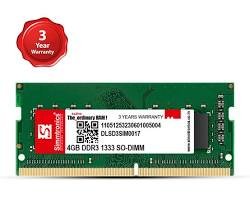
If your laptop is running slow, freezing during multitasking, or struggling with everyday apps, the issue is often not your processor — it’s your RAM. For thousands of laptop users across Pakistan still running older Intel Core i3/i5/i7 (2nd to 4th generation) or AMD systems, DDR3 RAM upgrades remain one of the cheapest and most effective ways to breathe new life into an aging machine.
At iT Online, we get one question every day: is DDR3 RAM still worth buying in 2026, and where can I get it in Pakistan at a fair price? This guide answers that question in full, covering compatibility, pricing, installation, and everything else you need to make a confident purchase.
What Is DDR3 RAM and Why Does It Still Matter?
DDR3, short for Double Data Rate 3, is a memory standard used in laptops manufactured roughly between 2010 and 2016. Despite being an older generation compared to DDR4 and DDR5, it is still the correct — and only — option for millions of laptops currently in use across homes, offices, and computer labs in Pakistan. If your laptop was built before 2015–2016, it almost certainly needs DDR3 RAM, not DDR4. Installing the wrong RAM type physically won’t fit into the slot, so getting this right matters before you order.
Signs Your Laptop Needs a DDR3 RAM Upgrade
Most users don’t realise their laptop’s slowdown is a RAM issue rather than a processor problem. Common signs include browser tabs causing the whole system to freeze, everyday apps like Excel, Word, or Chrome taking noticeably longer to open, the laptop struggling whenever two or more programs run together, and Windows updates or virus scans dragging the entire system to a crawl. If your current RAM is still sitting at 2GB or 4GB, that alone is usually reason enough to upgrade, since it’s well below a comfortable minimum for how software runs in 2026. If a couple of these sound familiar, a DDR3 RAM upgrade is likely the fastest and most affordable fix — often costing far less than buying a new laptop.
DDR3 vs DDR3L: Know the Difference Before You Buy
This is where most buyers in Pakistan get confused, so it deserves special attention. Standard DDR3 runs at 1.5V and is typically found in older, bulkier laptops, while DDR3L runs at a lower 1.35V and is used in most ultrabooks and newer laptop models from 2013 onward. According to Kingston’s own technical notes on the standard, DDR3L modules are generally designed to be backward compatible with systems built for standard DDR3, since older systems simply read them as regular 1.5V memory (source: Kingston Technology). The reverse isn’t always true, though. If you’re unsure which one your laptop needs, check the sticker on your current RAM stick, or simply contact the iT Online support team with your laptop model number before ordering — this small step avoids returns and wasted time later.
How Much DDR3 RAM Do You Actually Need?
The right amount of RAM really comes down to how you use your laptop day to day. For basic browsing, Word and Excel work, and other light use, a 4GB stick like this branded-used 4GB DDR3 module is usually enough to get by. If you multitask heavily, keep a lot of Chrome tabs open, or do occasional light editing, an 8GB DDR3 module running at 1333–1600MHz gives a much smoother experience and is what most home and office users end up choosing. For older gaming laptops or small businesses that need to run several applications at once, 16GB (typically two 8GB sticks) is worth considering where the laptop’s motherboard supports it. For most everyday users in Pakistan — students, home-based workers, and small offices — 8GB DDR3 RAM offers the best overall balance of price and performance.
DDR3 RAM Price in Pakistan: What to Expect
DDR3 RAM prices vary based on brand, capacity, and clock speed, particularly between 1333MHz and 1600MHz modules. As a general rule, 4GB sticks remain the most budget-friendly option and are ideal for a light upgrade, while 8GB sticks cost more but deliver a noticeably better multitasking experience. It’s also worth paying attention to the brand behind the chip itself — modules from Samsung, Hynix, Kingston, or Crucial tend to hold up better long-term than unbranded or heavily refurbished chips, even if the upfront saving looks tempting.
At iT Online, we stock both new and tested laptop-grade DDR3 and DDR3L modules sourced to match Pakistan’s most common laptop models, including HP, Dell, Lenovo, and Toshiba, with pricing updated regularly to reflect current import and currency conditions. You can browse our full memory range, along with DDR4 and DDR5 options for newer machines, in the Laptop RAMs section of our store.
How to Install DDR3 RAM in a Laptop
Installing DDR3 RAM yourself is a fairly simple process once you know the steps. Start by powering off the laptop completely and unplugging it, removing the battery first if it’s removable. Ground yourself by touching a metal surface so static doesn’t damage the new memory stick. Next, locate the RAM compartment, which is usually accessible through a small panel on the underside of the laptop. To remove the old stick, gently push the side clips outward until it pops up at an angle, then slide it out. Insert the new DDR3 stick at the same angle, making sure the notch lines up correctly, and press down until the clips lock into place. Finally, reassemble the laptop and power it on — the system should detect the new memory automatically without any extra setup.
If you’re not comfortable opening your laptop yourself, iT Online offers installation support, so feel free to reach out to our team rather than risk damaging your device.
Why Buy DDR3 RAM from iT Online?
Every module we sell is genuine and tested for compatibility and stability before it ships, and we deliver nationwide across Pakistan, from Karachi and Lahore to smaller cities. Because DDR3 and DDR3L compatibility can be confusing, our team helps confirm the exact RAM your laptop needs before you place an order, rather than leaving you to guess. Our pricing stays fair and transparent, without the inflated “urgency” pricing that’s common with unverified sellers, and our warranty and refund policy means if something doesn’t fit or work as expected, real support is there to help rather than pass you along. Whether you’re upgrading a single laptop at home or sourcing RAM in bulk for an office or computer lab, the full iT Online shop is built to make the process simple and reliable for buyers across Pakistan.
Final Thoughts
DDR3 RAM isn’t outdated — for the millions of laptops still built around this memory standard, it’s the only right choice, and often the single best upgrade you can make for the price. Before buying, confirm whether your laptop needs standard DDR3 or DDR3L, decide on the right capacity for your workload, and choose a seller who can guarantee compatibility and quality.
Ready to upgrade? Browse iT Online’s DDR3 RAM collection or reach out with your laptop model, and our team will help you find the exact match, fast, reliable, and backed by real support.
Frequently Asked Questions
Can I use DDR3 RAM in a laptop that supports DDR4?
No. DDR3 and DDR4 RAM have different physical notches and pin counts, so a DDR3 stick cannot physically fit into a DDR4 slot, and vice versa. Always confirm your laptop’s supported RAM type before purchasing.
What is the difference between DDR3 and DDR3L RAM?
DDR3 runs at standard voltage (1.5V), while DDR3L runs at low voltage (1.35V) for better power efficiency. Most laptops made after 2013 use DDR3L, and it’s generally compatible with systems designed for standard DDR3.
How much DDR3 RAM is enough for a laptop in 2026?
For everyday browsing and office use, 8GB DDR3 is the recommended minimum for a smooth experience. 4GB can still work for very light, single-task usage, while 16GB suits heavier multitasking on older gaming or workstation laptops.
Does adding more DDR3 RAM make my laptop faster?
More RAM reduces slowdowns caused by multitasking and heavy background processes, but it won’t increase raw processor speed. For laptops with 2GB–4GB RAM, upgrading to 8GB typically delivers a very noticeable improvement.
Where can I buy genuine DDR3 RAM online in Pakistan?
iT Online offers tested, genuine DDR3 and DDR3L laptop RAM with nationwide delivery across Pakistan, along with model-specific compatibility support to ensure you order the correct stick the first time.
