
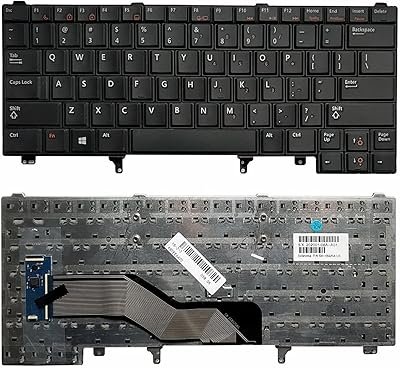
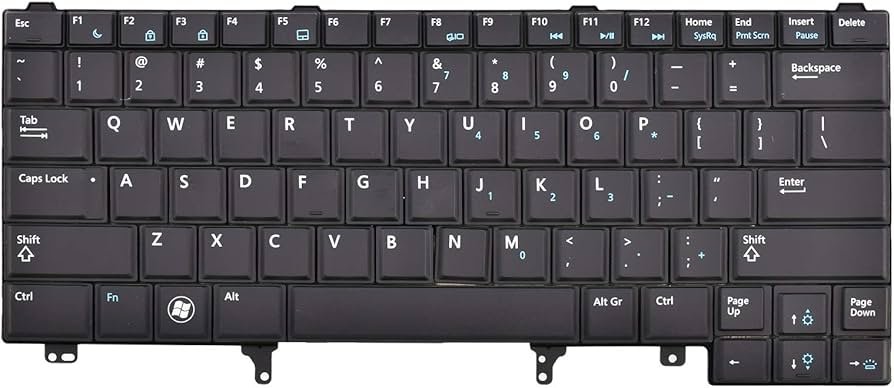
Upgrade or repair your Dell Latitude with a high-quality, non-backlit replacement keyboard designed for a wide range of E-Series laptops. This US English layout keyboard offers a consistent, professional typing experience, making it the perfect solution for faulty, cracked, or unresponsive keys.
Broad Compatibility
This keyboard is a versatile replacement part, fully compatible with the following Dell Latitude and XT models:
- 14-Inch Series: E6420, E6430, E6430s, E6430ATG, E6440
- 14-Inch M-Series: E5420, E5420M, E5430
- 12 & 13-Inch Series: E6220, E6230, E6320, E6330
- Convertible Series: Latitude XT3
Key Specifications
- Layout: US English (QWERTY)
- Backlight: None (Non-Backlit version)
- Pointer Stick: None
- Color: Classic Matte Black
- Frame: Includes the surrounding frame for easy installation
- Material: Durable ABS plastic with laser-etched legends to prevent fading
Why Choose This Keyboard?
- Plug-and-Play Performance: Once installed, your laptop will automatically recognize the keyboard with no additional drivers required.
- Tactile Response: Designed with a 1.5mm key travel for a responsive and comfortable typing experience similar to the original factory unit.
- Spill Resistance: Features a protective layer beneath the keys to help safeguard internal components from minor spills.
Quick Installation Guide
Replacing your Dell Latitude keyboard is a straightforward process that typically takes about 15 minutes:
- Safety First: Power off the laptop and remove the battery.
- Remove Bezel: Carefully pry up the plastic trim bezel surrounding the keyboard using a flathead screwdriver or plastic scribe.
- Unscrew: Remove the screws securing the keyboard (usually 4 screws at the top and 2 at the bottom).
- Disconnect: Gently lift the keyboard and unplug the ribbon cable from the motherboard.
- Install: Connect the new keyboard cable, snap it into place, and replace the screws and bezel.


There are no reviews yet.