
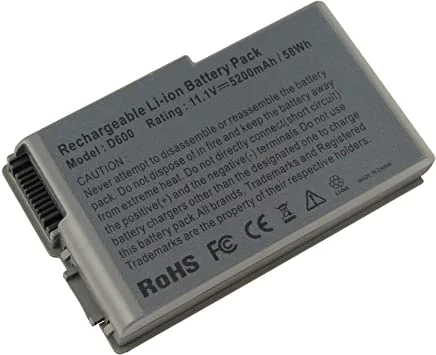
If your Dell Latitude D520 shuts down within minutes of unplugging the charger, the culprit is almost certainly an aged battery. The D520 is a durable business laptop that many offices, students, and small businesses in Pakistan still use daily. With a fresh laptop battery for Dell Latitude D520, it can run untethered again, without the need to buy a new machine.
IT Online offers replacement batteries for Dell laptops, so you can restore your backup time without hunting through markets. Browse our full range of Dell laptop batteries or read on to learn how to choose the right one.
Why the Dell Latitude D520 Still Matters in Pakistan
The Latitude D520 is a business-class laptop known for its sturdy build, comfortable keyboard, and dependable performance for everyday tasks like documents, email, browsing, and accounts software. Because it is built to last, many units are still in use across Pakistan.
The battery, however, is a consumable part. Lithium-ion cells lose capacity with every charge cycle and with age, even if the laptop sits unused. Replacing the Dell Latitude D520 battery is the most affordable way to bring the laptop back to a practical, portable state.
Signs You Need a Dell D520 Battery Replacement
Watch for these common symptoms:
- Very short backup: The laptop dies within 10 to 20 minutes of unplugging.
- Sudden shutdowns: Battery shows 40 to 50% and the laptop switches off abruptly.
- Battery not charging: The charging light behaves oddly, or the percentage stays stuck.
- “Consider replacing your battery” warning: Windows or Dell’s diagnostics report a poor battery.
- Swollen or warped battery: If the pack bulges or the base looks lifted, stop using it immediately and replace it. A swollen battery is a safety risk.
- Works only on AC power: The laptop runs only while plugged in.
If your laptop fails to charge even with a new battery, the problem may be elsewhere. Test with a known-good Dell laptop charger first. If the charger is fine, a worn Dell DC jack or a fault on the Dell motherboard may be the cause.
Laptop Battery for Dell Latitude D520: Key Features
(Adjust these details to match your exact listing.)
- Compatible model: Dell Latitude D520 (also fits other models in the same series, as listed)
- Type: Rechargeable lithium-ion, 6-cell
- Voltage: 11.1V
- Capacity: Replacement packs for this series are commonly sold in 4400mAh and 5200mAh versions
- Fit: Drop-in replacement, no modification needed
- Common part numbers: GD761, KD476, XD187, XD189, UD267 (always confirm against the label on your old battery)
- Use: Restores portable use for work, study, and travel
A Dell D520 6 cell battery typically gives noticeably longer backup than a smaller cell count, which suits people who move between classrooms, meetings, or load-shedding hours.
How to Choose the Right Dell Latitude D520 Battery
Buying the wrong battery wastes money and can harm the laptop. Check these points first.
1. Match the Model and Part Number
Turn off the laptop, unplug it, and remove the old battery. Read the model and part number printed on the label. Confirm that the replacement lists the Latitude D520 as compatible.
2. Check Voltage and Cell Count
Voltage must match your original battery. A 6-cell pack generally offers longer runtime than a 4-cell one.
3. Buy From a Reliable Seller
Low-quality batteries can overheat, drain quickly, or fail within weeks. Buy from a trusted seller that provides clear product details and after-sales support. IT Online is a laptop-focused brand serving customers across Pakistan.
4. Look at Warranty and Return Terms
A genuine seller should clearly state what happens if the battery is defective on arrival. Read our Warranty & Refund Policy before you order.
5. Compare Price Against Quality
The Dell D520 battery price in Pakistan varies by cell count and quality. Extremely cheap batteries often use poor cells. Pay for a dependable battery instead of replacing a bad one every few months. You can also compare options across our laptop batteries collection.
How to Replace the Dell Latitude D520 Battery
Replacement is simple and needs no tools on most units. For the official steps and diagrams, see Dell’s Latitude D520 User’s Guide.
- Shut down the laptop and unplug the charger.
- Flip the laptop over on a soft, clean surface.
- Slide the battery release latch and hold it open.
- Lift out the old battery.
- Align the new battery with the bay and press it in until it clicks.
- Turn the laptop over, connect the charger, and power on.
Dispose of the old battery responsibly. Never throw lithium-ion batteries in household waste or fire. Take them to an electronics recycler.
Tips to Make Your New Laptop Battery Last Longer
- Avoid extreme heat: Do not leave the laptop in a hot car or on a bed or pillow while it runs. Heat combined with a full charge is the fastest way to age a lithium-ion battery, as explained in Battery University’s guide to prolonging lithium-based batteries.
- Do not keep it at 100% all the time: If the laptop stays plugged in for weeks, consider removing the battery and storing it partly charged.
- Avoid full discharge: Try not to run the battery to 0% regularly. Partial discharges are fine for lithium-ion.
- Use the original or a quality charger: Poor chargers can damage cells.
- Keep the laptop cool: Dust-clogged vents cause heat. If your fan is noisy or weak, a replacement Dell laptop fan can help.
- Calibrate occasionally: An occasional full charge and discharge helps the battery meter report accurately.
Why Buy a Laptop Battery From IT Online?
IT Online focuses on laptops and laptop accessories for Pakistani customers. When you buy a laptop battery online in Pakistan from us, you get:
- A battery matched to the Dell Latitude D520
- Clear product information so you know what you are buying
- Delivery across Pakistan
- Support from a team that understands Dell laptops and their parts
Still using an older machine like the D520? Our Core 2 Duo laptops and Dell laptop keyboards can help keep your setup running. For more guides, visit the IT Online blog.
Frequently Asked Questions
1. Which battery is compatible with the Dell Latitude D520?
The Dell Latitude D520 uses an 11.1V lithium-ion battery. Common compatible part numbers include GD761, KD476, XD187, XD189, and UD267. Check the label on your old battery and the product listing before ordering, or contact IT Online and we will confirm the fit.
2. How long does a Dell Latitude D520 battery last?
A good 6-cell battery generally lasts a few hours on light tasks, but runtime depends on screen brightness, running apps, and the battery’s age. Overall lifespan is typically two to three years, or roughly 300 to 500 charge cycles.
3. Why is my Dell D520 not charging even with a new battery?
Check the charger first, then the charging port and the battery contacts. If the laptop still does not charge, the DC jack or motherboard charging circuit may need repair, so have a technician inspect it.
4. What is the Dell D520 battery price in Pakistan?
Price depends on cell count, capacity, and quality. For the latest price of the laptop battery for Dell Latitude D520, check the Dell battery category on IT Online or contact our team.
5. Can I use the Dell Latitude D520 without a battery?
Yes, the laptop can run on AC power alone with the battery removed. However, a working battery protects against sudden power cuts, which are common in Pakistan and can cause data loss.
Order Your Dell Latitude D520 Battery From IT Online Today
Don’t let a worn-out battery chain your laptop to a wall socket. Get a reliable laptop battery for Dell Latitude D520 from IT Online and enjoy dependable backup again. Visit our Dell battery collection or contact our team to order, and we will deliver it to your doorstep anywhere in Pakistan.
