
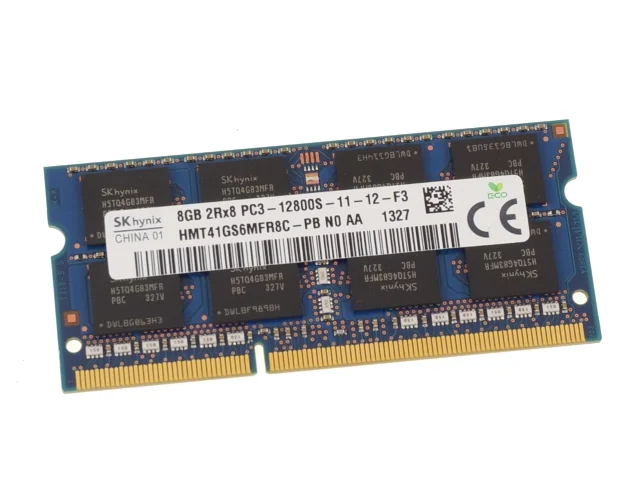
If your laptop feels slow, crashes often, or struggles to run multiple apps at once, a RAM upgrade can transform your experience. Today, we break down everything you need to know about ddr3 laptop ram price in pakistan — from understanding specifications to finding the best deals at IT Online, your trusted Pakistani tech store.
Whether you are a student in Lahore, a freelancer in Karachi, or a gamer in Islamabad, this guide helps you make a smart, budget-friendly decision before you buy DDR3 RAM for your laptop. You can browse our full range of Laptop RAMs and Storage Devices to find the right match for your machine.
What Is DDR3 RAM and Why Does It Matter?
DDR3 stands for Double Data Rate 3. It is the third generation of DDR memory technology and remains one of the most widely used memory types in laptops sold between 2009 and 2017. Even in 2026, millions of Pakistani users rely on DDR3 laptop computers for daily tasks. You can find our dedicated category of DDR3 laptop RAM modules stocked and ready to ship across Pakistan.
Unlike desktop memory, laptop RAM uses a smaller form factor known as SO-DIMM (Small Outline Dual In-line Memory Module). So when you search for a DDR3 SO-DIMM RAM module, you are specifically looking for the right size that fits inside your laptop’s memory slot. IT Online also stocks Computer RAMs for desktop users looking to upgrade their desktop systems separately.
DDR3 Laptop RAM Price in Pakistan — Quick Overview
Prices vary depending on capacity, brand, and speed. Below is a current price comparison table to help you understand the ddr3 laptop ram price in pakistan market at a glance. For live pricing, always check our RAMs section for the latest stock and offers.
| Capacity | Type | Speed | Approx. Price (PKR) | Best For |
|---|---|---|---|---|
| 4GB DDR3 | SO-DIMM | 1333/1600 MHz | Rs. 1,500 – Rs. 2,500 | Basic tasks, older laptops |
| 8GB DDR3 | SO-DIMM | 1600 MHz | Rs. 2,800 – Rs. 4,500 | Multitasking, office work |
| 16GB DDR3 | SO-DIMM | 1600/1866 MHz | Rs. 6,500 – Rs. 10,000 | Heavy tasks, editing |
| 4GB DDR3L | SO-DIMM | 1333/1600 MHz | Rs. 1,800 – Rs. 2,800 | Low-voltage laptops |
| 8GB DDR3L | SO-DIMM | 1600 MHz | Rs. 3,200 – Rs. 5,000 | Ultra-thin notebooks |
Prices listed above reflect the current market as of mid-2026 and may fluctuate due to USD exchange rates. Always check IT Online’s live shop before purchasing to get the most accurate and up-to-date pricing.
Top Brands for DDR3 Laptop RAM Available in Pakistan
When you buy DDR3 RAM in Pakistan, choosing a reliable brand protects your investment and ensures system stability. Here are the most trusted names available at IT Online:
| Brand | Origin | Reliability | Shop at IT Online |
|---|---|---|---|
| Samsung | South Korea | Excellent | Laptop RAMs |
| Kingston | USA | Excellent | Kingston Brand |
| SK Hynix | South Korea | Very Good | Laptop RAMs |
| Adata | Taiwan | Good | Adata Brand |
| Team Group | Taiwan | Good | Storage Brands |
Samsung and Kingston dominate the laptop memory market in Pakistan. You can browse Adata products on IT Online for budget-friendly options. If you want to buy DDR3 RAM on a tight budget, Adata and Team Group deliver solid value for money.
How to Choose the Right DDR3 Laptop RAM for Your Laptop
Before you rush out to buy a DDR3 module, you must verify compatibility with your specific laptop model. Follow these steps to choose correctly. If you need help deciding, our IT Online support team is always available to assist you.
Step 1 — Identify Your Current Memory Configuration
Press Ctrl + Shift + Esc to open Task Manager on Windows. Click the “Performance” tab and then select “Memory.” You will see your current RAM size, speed, and form factor. This tells you exactly what kind of DDR3 memory your laptop already uses.
Step 2 — Check Your Laptop’s Maximum Supported RAM
Every laptop has a RAM limit set by its motherboard. Some older models cap out at 8GB DDR3, while others support up to 16GB DDR3. Check your laptop’s official manual or the manufacturer’s website. You can also browse laptop motherboards at IT Online if you need to upgrade your board as well.
Step 3 — Verify the Speed (MHz)
Common PC3 DDR3 memory speeds include 1066 MHz (PC3-8500), 1333 MHz (PC3-10600), 1600 MHz (PC3-12800), and 1866 MHz (PC3-14900). Installing a higher-speed module will not damage your laptop — the RAM will simply run at the lower speed. Check our complete laptop DDR3 memory listing to find your exact required speed.
Step 4 — DDR3 vs DDR3L — Know the Difference
Some modern laptops use DDR3L (low-voltage) memory that operates at 1.35V instead of the standard 1.5V. IT Online stocks both variants — browse our Laptop RAMs category and filter by DDR3 or DDR3L to find the right match.
Where to Buy DDR3 Laptop RAM in Pakistan
Pakistan has a healthy IT hardware ecosystem. Furthermore, shopping online has never been easier. IT Online offers nationwide delivery, competitive pricing, and genuine products backed by warranty — making it the most convenient way to buy DDR3 RAM in Pakistan without leaving your home.
Shop Online at IT Online
- Laptop RAMs — Browse all laptop DDR3, DDR3L, and DDR4 memory modules
- All RAMs — Full collection of both laptop and desktop RAM
- Computer RAMs — Desktop DDR3 and DDR4 modules for PC upgrades
- Storage & Memory — Explore the complete storage upgrade category
- SSD Drives — Pair your RAM upgrade with a fast SSD for maximum performance
Should You Upgrade to 4GB, 8GB, or 16GB DDR3?
Choosing the right capacity depends on what you use your laptop for. Here is a practical breakdown to guide your DDR3 RAM upgrade. Once you know your required capacity, head directly to our Laptop RAMs page to place your order.
| Use Case | Recommended Capacity | Why? |
|---|---|---|
| Basic browsing, MS Office | 4GB DDR3 RAM | Sufficient for light tasks on older systems |
| Multitasking, Chrome + Office | 8GB DDR3 RAM | Smooth performance for daily professional use |
| Video editing, light gaming | 16GB DDR3 RAM | Handles memory-intensive applications well |
| Programming, virtual machines | 16GB DDR3 RAM | Multiple processes run simultaneously without lag |
For most Pakistani users upgrading an older laptop, going from 4GB DDR3 to 8GB DDR3 RAM delivers the biggest performance gain per rupee spent. It is the sweet spot of the DDR3 RAM upgrade journey. If you also use your laptop for gaming, consider pairing the upgrade with a graphics card upgrade for an all-round performance boost.
Benefits of Upgrading Your Laptop’s DDR3 RAM
A RAM upgrade is one of the most cost-effective ways to improve an aging laptop. Furthermore, pairing your laptop DDR3 memory upgrade with a new SSD drive creates a dramatically faster system for a fraction of the cost of buying a new laptop.
- Faster multitasking — run more browser tabs, apps, and background processes at once
- Reduces system lag and freezing caused by low memory availability
- Improves boot times especially when combined with an SSD storage upgrade
- Extends the useful life of your laptop by 2–3 more years
- More affordable than buying a new laptop — especially at current ddr3 laptop ram price in pakistan
- Easy DIY upgrade — most laptops allow SO-DIMM DDR3 swaps in under 10 minutes
Things to Avoid When Buying DDR3 RAM in Pakistan
The Pakistani tech market, while vibrant, has its share of counterfeit and substandard products. Therefore, always purchase from a trusted source like IT Online, which provides genuine products with clear return and refund policies. Review our Warranty & Refund Policy before purchasing for complete peace of mind.
- Buying from unverified street vendors without receipts or warranty
- Choosing “no-name” or unbranded DDR3 module products with no specification label
- Ignoring the difference between PC3 RAM speeds — mismatched speed can cause crashes
- Purchasing used 8GB DDR3 RAM without testing it first in-store
- Assuming all SO-DIMM slots are the same — always verify DDR3 vs DDR4 compatibility
How to Install DDR3 Laptop RAM — A Quick Overview
Installing a DDR3 notebook RAM module is straightforward. Even beginners can do it safely by following these steps. If you need tools, IT Online also stocks a range of laptop parts and accessories to support your upgrade.
- Power off your laptop completely and remove the battery if possible. IT Online carries laptop batteries if yours needs replacement at the same time.
- Open the bottom panel using a Phillips screwdriver
- Locate the SO-DIMM DDR3 slot(s) on the motherboard
- Remove the existing DDR3 module by pushing outward on the side clips
- Insert the new laptop DDR3 memory at a 45-degree angle and press down until it clicks
- Reassemble the panel, power on, and verify via Task Manager or BIOS
If you are not comfortable doing this yourself, any IT shop in Hall Road, Saddar, or your city’s tech market will install it for a small service fee of Rs. 200–500. You can also reach our team through the IT Online Contact page for guidance before you order.
Is DDR3 Still Worth Buying?
With newer DDR4 and DDR5 memory standards dominating the market, you might wonder whether a DDR3 RAM upgrade is still smart. The answer depends on your situation.
If your laptop is a Core i3, i5, or i7 from the 2nd to 4th generation, it almost certainly uses DDR3 laptop memory. IT Online stocks laptops from the 2nd generation, 3rd generation, and 4th generation — all of which use DDR3 memory. Buying a new laptop is a major expense right now. Instead, upgrading your existing machine with affordable laptop DDR3 memory is a practical performance boost that saves thousands of rupees.
Furthermore, the ddr3 laptop ram price in pakistan is very reasonable right now. Visit IT Online’s Laptop RAM store to see the latest prices and make your purchase today before they rise again due to currency fluctuations.
